
My OpenClaw Setup
Wanted a setup to serve a small team, non tech ppl

I wanted an AI agent the team can use daily, directly from Slack, with two clear goals:
speed up repetitive work (search, summaries, drafts, quick lookups across tools)
keep it operationally controllable (self-hosted, small perimeter, observability, clear access rules)
Context: a small team (around 10 people), a shared knowledge base, and no dedicated IT department. Below is the architecture and what I learned, without config dumps or raw JSON.
Setup decisions
Platform: OpenClaw, self-hosted on a VPS
Interface: Slack Socket Mode (WebSocket)
Agents: two agents behind the same gateway (personal + team)
Isolated execution: Docker sandbox for the team agent
Memory: markdown files + embeddings + local index
Integrations: Monday.com, Google Workspace, web search, internal apps
Ops: watchdog, daily report, backups, log rotation
Two agents, not one. I split “personal chat” from “team agent” to get:
simple routing (DM vs channel)
different rules and permissions (stricter for the team agent)
less context contamination between discussion and execution
Different models. The personal agent uses a fast model for general conversation; the team agent uses a model that behaved better at tool-use. I preferred manual control instead of auto-routing because the auto-router often picked weaker models in practice.
Fallback chain. Each agent has a list of backup models. If the primary is down, the gateway automatically fails over to the next one (Gemini Flash, Qwen, GPT-5, Claude Sonnet, etc).
Session expiry. Sessions reset after 30 minutes of inactivity. Without this, context grows incrementally and eventually things stall.
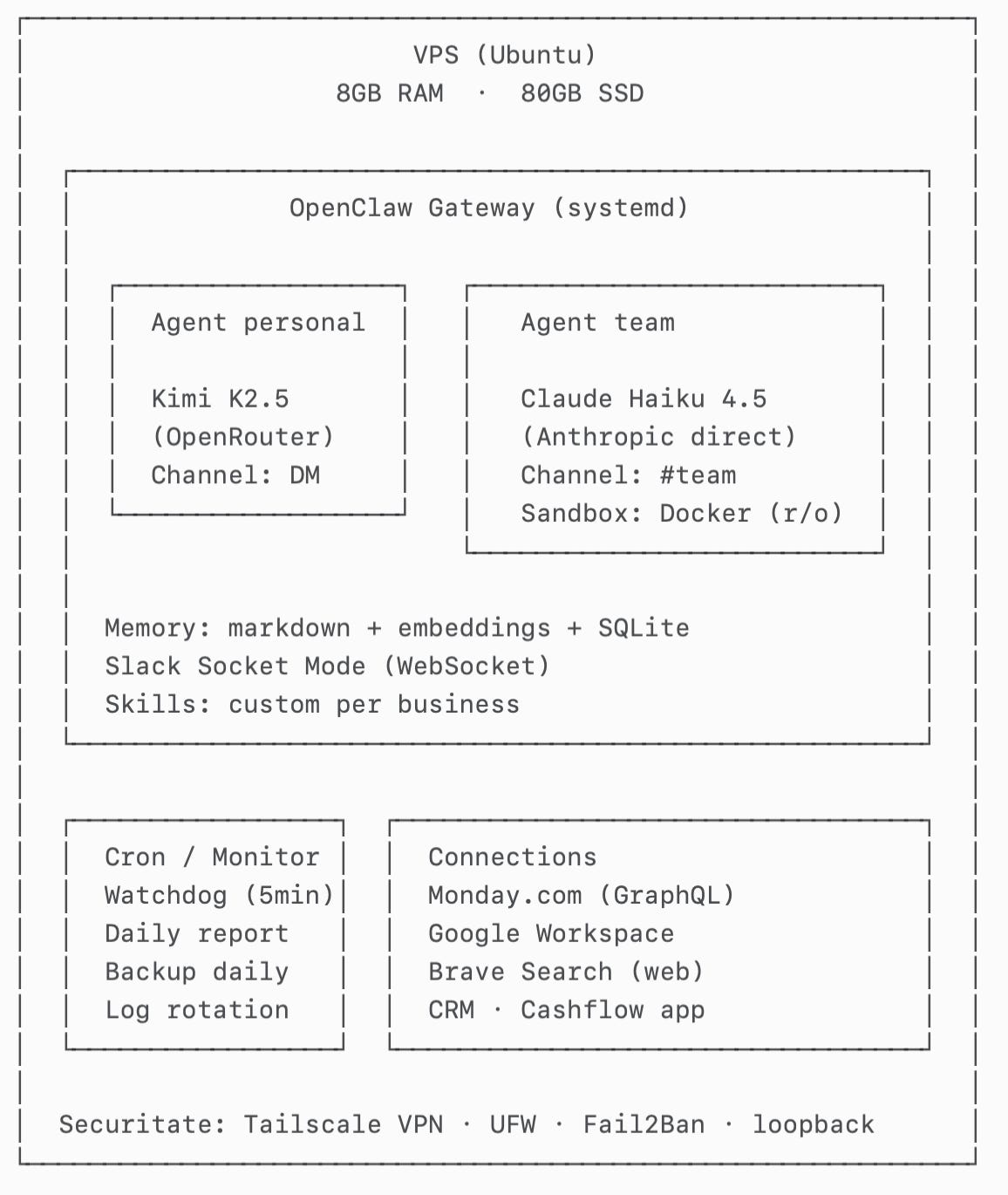
Current shape (high level)
Important execution detail:
The team agent runs commands inside a Docker sandbox (workspace mounted read-only).
Some tools still run on the host. The container is configured in bridge mode so it can reach certain host-exposed capabilities in a controlled way. The goal is separation: isolated execution, practical integrations.
Architecture decisions
Infrastructure: Ubuntu VPS. OpenClaw runs as a systemd service. Slack connects via Socket Mode.
Message routing: the gateway receives all Slack events and routes by channel:
DM with me → personal agent
dedicated channel (#team) → team agent
This is intentionally simple: a channel → agent binding.
Docker sandbox for the team agent: commands and execution happen in the container, with a read-only mounted workspace. This reduces the risk that prompt injection turns into “write to disk / modify host state”.
Static curl binary: the built-in fetch tool supports only GET, while Monday.com (GraphQL) requires POST. I solved this pragmatically by adding a static curl binary inside the sandbox (no extra dependencies on the host).
Google Workspace: the agent has a dedicated workspace identity with controlled access. For Gmail specifically: it can read and create drafts, but it never sends without explicit confirmation.
Skills on-demand: I keep instructions modular (“skills”) and load them only when needed. This was the difference between a generic agent and something useful in a real business.
Security decisions (principles)
1) Minimal exposure
admin access only via VPN (Tailscale)
public ports closed with UFW
gateway bound to loopback only
Fail2Ban for basic access hardening
2) Least privilege
tight scopes on integrations
different permissions for personal vs team agent
3) Human-in-the-loop for write
reads are allowed by default (search, list, summarize)
writes require confirmation (send email, modify tasks, create docs, etc.)
4) Config integrity
agents are explicitly instructed to never modify config files (routing, auth profiles, sandbox, models)
any infrastructure change goes through an internal double confirmation
Monitoring and automated checks (based on real failure modes)
I built this around “what could leave the system dead since Friday night”.
Signals I track:
whether the gateway is running
recent log activity (detects “silent” disconnects)
session size (context growth)
stuck executions (lots of input, no output)
Automated actions:
cleanup + restart if sessions exceed thresholds
restart if there is no log activity for a window
daily health report
daily backups for workspace + config
log rotation
Memory (the decision that changes everything)
An agent without persistent memory becomes a chatbot that forgets. For a team, that means every conversation starts from scratch: who’s who, how you name internal things, what projects are active, what the rules are for email/tasks, what “done” means.
In practice I need memory for two classes of questions:
Fast context recall: “what’s the status of project X”, “what were the latest decisions”, “what did we agree with client Y”. Semantic search works well here.
Relational questions (the reason I’m looking at graph memory): “who owns X”, “what depends on Y”, “which tasks are blocked by Z”, “which docs matter for client A”, “who is allowed to approve/send/modify”. Pure vector search becomes approximate here.
Why I’m interested in graph memory
Graph memory explicitly models entities (people, clients, projects, documents, tasks) and relations (owner-of, depends-on, belongs-to, mentioned-in, approved-by). The advantages I’m after:
Deterministic relation queries (“owner”, “depends on”), not just “most similar paragraphs”.
Cleaner updates: when an owner/status changes, you update a node/edge instead of adding another paragraph that contradicts history.
Less duplication: the same entity shows up across many conversations; a graph gives you a single source of truth.
Why I considered mem0 (and why I haven’t adopted it yet)
I looked at mem0 because it aligns with “graph memory”: entities + relations, and a structure that supports “who/what/where/depends-on” queries. In theory, it’s the natural next step once you move to shared memory across multiple people.
What stopped me for now (at our scale):
Extra infrastructure (often Neo4j as a separate service) and the ops overhead.
Write overhead: typically multiple LLM calls to extract entities/relations, increasing latency and cost per “add to memory”.
Isolation model: many implementations are oriented around per-user memory; for a company I want shared memory with clear permissions and provenance.
What I use today (and why)
For now I’m using:
OpenClaw built-in memory search: transparent markdown files + embeddings + local index (SQLite) with hybrid search (semantic + keyword).
It’s pragmatic: easy to operate, easy to audit, easy to repair, and good enough for ~80% of questions. The plan is to revisit graph memory after 1–2 months of stable usage and tighter discipline around what enters memory (otherwise a graph just structures chaos).
Bottlenecks and issues (what broke and how I fixed it)
The LLM “described” actions instead of calling tools
Symptom: answers like “I would run command X” with no tool call visible in logs.
Impact: in the team channel it looked “smart” but nothing actually happened.
Fix: better tool-use model for the team agent + explicit instruction (“if you need a tool, call it, don’t describe it”) + a completion check (“done = output exists, not just steps”).
Context overflow from large responses (APIs returning huge JSON)
Symptom: after a few interactions, session size grew to hundreds of KB; the agent became slow or stalled (Slack still looked “alive”).
Cause: large raw responses kept verbatim in context.
Fix: cap results (e.g., 25 items per query), aggressive summarization, avoid pasting raw JSON; watchdog clears sessions over a threshold (e.g., 500KB) + session expiry after 30 min of inactivity.
Slack Socket Mode “silent” disconnects
Symptom: gateway reported “connected” but messages stopped arriving.
Fix: 5-minute watchdog checks for recent log activity; if no new logs within a window (e.g., 15 minutes), it triggers a controlled restart.
Upgrade broke sessions / compatibility
Symptom: after an upgrade, conversations started hanging immediately.
Fix: rollback to the last stable version + version pinning; upgrades only after testing in a separate environment (staging) or during an accepted-risk window.
HTTPS failed inside the sandbox (missing CA certs in slim images)
Symptom: HTTPS requests from the container failed with certificate errors.
Fix: install/copy CA certificates into the container and set environment variables where needed (e.g., SSL_CERT_FILE).
Environment variables didn’t reliably inject into the container
Symptom: commands worked sometimes, then returned 401/403 because env vars were missing.
Fix: explicit inline exports in commands + preflight checks in the sandbox (printenv) before sensitive calls.
Built-in web_fetch didn’t support POST (Monday GraphQL)
Symptom: couldn’t call GraphQL endpoints with GET-only tooling.
Fix: static curl inside the sandbox and controlled POST calls.
Questions for others running agents for teams
How do you do shared memory across multiple people without turning it into chaos?
How do you manage permissions and write actions (confirmations, auditability, rollback)?
Self-hosted vs SaaS vs hybrid: what hit you the hardest in production?